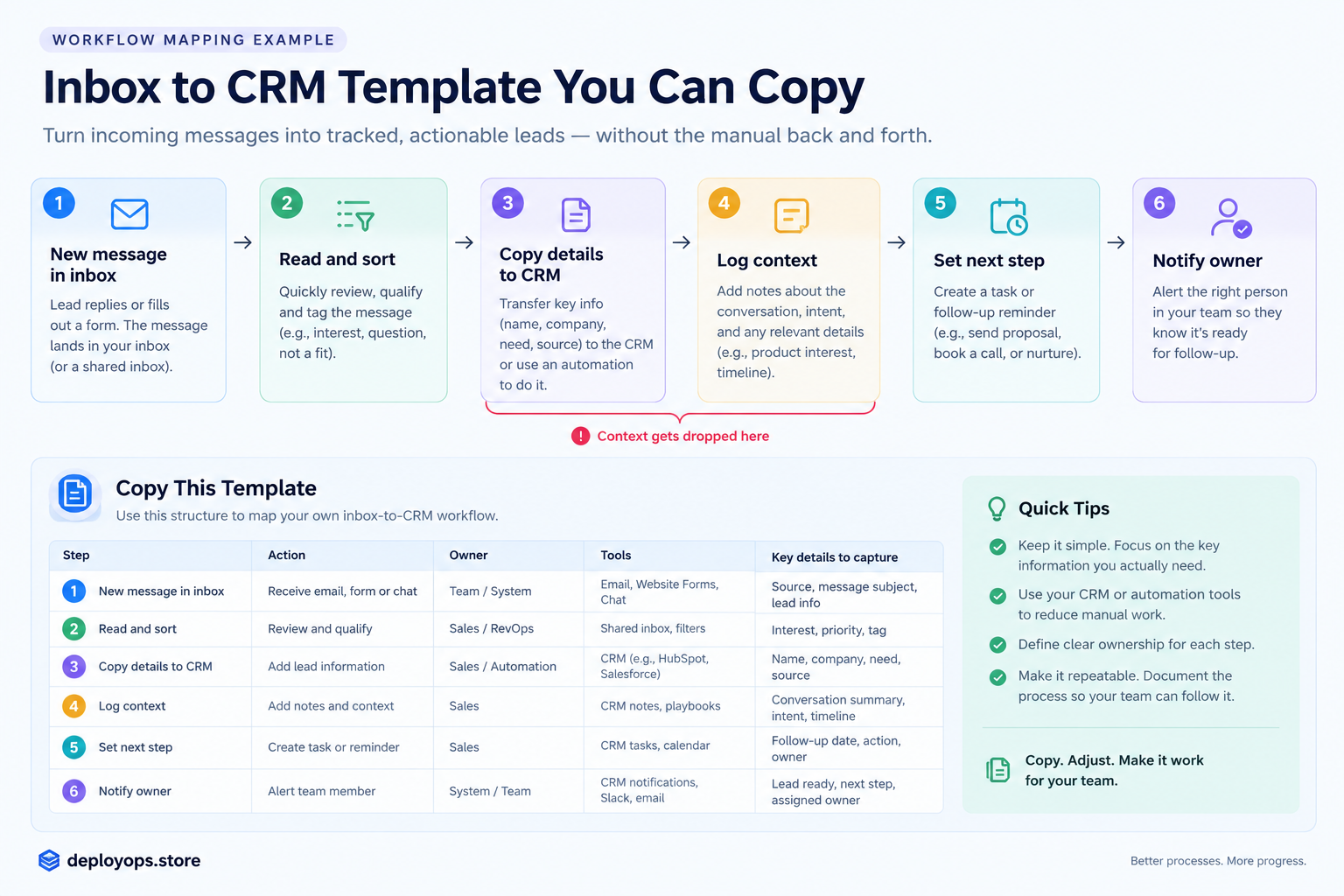
Workflow mapping is the practice of drawing how one piece of work moves from start to finish: each step, the tool it happens in, the person who does it, and every handoff in between. A good workflow map shows where work is retyped, delayed or stripped of context, so you can fix those points before you buy another tool.
- Map one workflow from first trigger to final action.
- Count tool boundaries and manual steps. Time and context leak at those points.
- Fix the worst handoff first. New software comes last.
- The sample below has six steps, three tools and four manual steps. Click through it, then copy the template.
What is workflow mapping?
Workflow mapping is a visual record of how work actually gets done. It lists the steps in order, the owner of each step, the tool involved, and the points where one step hands work to the next. Teams use it to find bottlenecks, remove duplicate effort and decide what to automate.
A useful map is small. It covers one workflow with one outcome, such as “a prospect replies and the account owner knows what to do next.” It uses plain conventions: a box for a task, a diamond for a decision, and a lane for each person or tool. If you can explain it to a new hire in two minutes, it is detailed enough.
Workflow mapping vs process mapping
Process mapping usually describes what a business does at a higher level, often across departments, to design or improve how an outcome is produced. Workflow mapping zooms in on how a specific piece of work moves through specific people and tools. A process map asks what should happen. A workflow map asks what happens on a Tuesday afternoon when a reply lands in a shared inbox. The two overlap, and many teams use the terms interchangeably. If you are starting out, begin with the workflow, because it is where the daily friction lives.
Why map your workflow before adding another tool?
Every new tool adds at least one new handoff. A handoff is any point where a person has to move information from one place to another, and handoffs are where work slows down and context disappears. A team that adds software without mapping usually ends up with more tabs and the same problem.
The numbers below come from published research on sales teams and knowledge workers. They explain why the handoffs matter.
| Finding | Figure | Source |
| Share of a rep’s week spent on selling | About 40% | Salesforce State of Sales, as cited by Attention |
| Reps who say note-taking and data input is their most time-consuming task | 68% | Salesforce State of Sales, as cited by Attention |
| App and website switches per worker per day | About 1,200 | Harvard Business Review (2022), as cited by Apollo |
| Average apps per company | 101 | Okta, Businesses at Work 2025, as cited by Apollo |
| Admin time per rep per week | Nearly 2 days | Forrester study of 3,031 reps, as cited by Apollo |
Read together, the picture is consistent. Reps spend most of their week outside selling, a large part of that is moving information between tools, and the number of tools keeps climbing. More software on top of that does not fix the movement. A map does, because it shows you where the movement happens.
Workflow mapping example: a sample inbox-to-CRM workflow
Below is a sample workflow for a small outbound team. It is an illustration built for this guide, not data from a customer. A prospect replies to an email, and the reply has to become a CRM record with context and a next step, and the account owner has to hear about it.
Click any station. Use the filters to see the manual steps or the points where context is at risk.
Interactive sample
Inbox to CRM: six steps, three tools
All stepsManual stepsContext at risk
- 1. Reply lands
- Email inbox
- 2. Read and sort
- Email inbox
- 3. Copy details to CRM
- Inbox to CRM
- 4. Log context
- CRM
- 5. Set next step
- CRM
- 6. Notify owner
- CRM to chat
Handled by a toolRetyped or moved by handContext at risk
Step 3: Copy details to CRM
What happens
Contact details move from the email into a CRM record.
Tool and owner
Inbox to CRM, SDR
Type
Manual
What gets lost
Name, title and company are retyped. Typos and duplicate contacts creep in.
Fix before buying a tool
Use the CRM’s email integration or a form so the contact is created from the thread, not retyped.
What this map shows
- Four of the six steps are manual. Steps 3, 4, 5 and 6 depend on a person copying, typing or forwarding.
- There are two tool boundaries. Work crosses from the inbox to the CRM at step 3 and from the CRM to chat at step 6. Retyping happens at both.
- Context is lost between steps 3 and 4. The CRM gets a name and a status. It does not get the reason this prospect mattered. Adding a fourth tool, such as a sequencing app, would add another boundary and leave that gap open.
How to do workflow mapping in five steps
You can run this in about an hour. Use a whiteboard, a spreadsheet or a plain document. The tool does not matter.
1. Pick one workflow with one outcome
Choose a workflow that touches revenue or causes regular complaints. Define the start and the end in one sentence each. “A reply arrives” to “the owner has a next step” is a good scope. “Our whole sales process” is not.
2. List every step, including the unwritten ones
Sit with the person who does the work and watch them do it once. Write down every action, including the ones nobody documents, such as checking a second tab or asking a colleague. Slack’s guide to workflow mapping makes the same point: involve the people who do the work early, because they know the steps that never made it into a handbook.
3. Record the tool and owner for each step
Next to each step, write where it happens and who does it. The moment a step moves from one tool to another, you have found a boundary. Mark it.
4. Flag manual steps and lost context
Mark every step where a person copies, retypes, forwards or remembers something. Then ask what information is available at that step and whether it survives to the next one. Context loss is the quiet cost, because nobody notices it until a follow-up goes wrong.
5. Fix the worst handoff before buying anything
Pick the single boundary that costs the most time or loses the most context. Check whether an existing integration, a required field or a shared template can fix it. Only if none of those work should you evaluate a new tool, and the map tells you exactly what that tool must do.
Workflow mapping template you can copy
This workflow mapping template uses the sample above. Replace the rows with your own steps. The copy button gives you tab-separated text that pastes cleanly into Google Sheets or Excel.
Template
| Step | Tool | Owner | Manual? | Minutes | What gets lost |
| 1. Reply lands | Email inbox | Whoever owns the shared inbox | No | 1 | Nothing yet. Replies can sit unread when nobody owns the inbox. |
| 2. Read and sort | Email inbox | SDR | No | 2 | Sorting rules live in someone’s head, so two people sort the same reply differently. |
| 3. Copy details to CRM | Inbox to CRM | SDR | Yes | 3 | Name, title and company are retyped. Typos and duplicate contacts creep in. |
| 4. Log context | CRM | SDR | Yes | 4 | The reason this prospect matters is reduced to a status like “replied, interested.” The why and the why now are gone. |
| 5. Set next step | CRM | SDR or AE | Yes | 2 | Follow-up dates are missing or vague, so replies go cold. |
| 6. Notify owner | CRM to chat | SDR | Yes | 2 | The alert is a forwarded email with no context, so the owner rereads the whole thread. |
What do manual handoffs cost you?
Time per step looks small, so teams ignore it. Multiplied across a month, it adds up. Enter your own numbers below. The starting values are examples, not benchmarks.
Calculator
Replies per week
Manual steps per reply
Minutes per manual step
23.1
Hours per month
277.1
Hours per year
5.8
Hours saved per month by removing one step
Estimate based on 4.33 weeks per month and the values you enter. It measures handling time only and ignores the cost of lost context and follow-ups that slip.
Process workflow mapping for small business
Small teams have an advantage. There are fewer people to interview and fewer tools to untangle, so the whole exercise fits in a single meeting. Three habits make it work.
- Map the workflow closest to revenue first. For most small teams that is lead response or quote follow-up.
- Keep it on one page. If the map needs scrolling, you scoped too wide.
- Review it when a tool changes. A map is only useful while it matches reality. Update it when you add, remove or reconfigure software.
You do not need diagramming software. Slack’s guide recommends starting simple and adding detail as exceptions appear, and that advice holds for a team of three as much as a team of thirty.
Sales workflow automation and AI workflow mapping
Automation works on a map, not on a mess. If you automate a step before understanding where its inputs come from, you speed up a flawed process. The map tells you which steps are rule-based enough to automate and which need human judgement, such as the sorting at step 2 of the sample.
AI changes what is possible at the handoffs. It can transcribe a call, draft CRM fields from a thread and summarize context for the next person. Research from Bain & Company, as cited by Apollo, projects that AI could roughly double selling time for firms that redesign workflows around it, not just add AI tools. The words that matter there are “redesign workflows.” That starts with a map.
Where OutboundOS fits in the sample
In the sample map, step 4 is where context is lost. The CRM records that a prospect replied and does not record why that prospect was worth contacting. OutboundOS is built around that gap. It produces a researched prospect brief instead of a bare lead record, so the reason a prospect matters travels with the record from the first email onward. We make OutboundOS, so weigh that accordingly. The mapping method above works with any set of tools, and you can use it before you evaluate us or anyone else. You can see the product at deployops.store.
Checklist: are you ready to add another tool?
Tick each statement that is true for your team today.
Interactive checklist
- I can draw every step from reply to next action on one page.
- I know which steps are manual and who does each one.
- I know where context gets dropped between steps.
- I have timed the slowest handoff at least once.
- Our current tools cannot fix it with a setting, an integration or an automation.
- I can name the one metric a new tool must improve.
0 of 6. Map first. You are not ready to buy, and a map will likely save you the purchase.
Frequently asked questions
What is a workflow mapping example?
A workflow mapping example is a drawn path of one real piece of work from trigger to outcome, showing each step, the tool it happens in, who does it and where it is handed off. The inbox-to-CRM workflow above is one: a prospect reply arrives, someone sorts it, copies the details into the CRM, logs context, sets a next step and notifies the account owner.
How do you do workflow mapping?
Pick one workflow with one outcome, list every step including unwritten ones, record the tool and owner for each step, mark manual steps and the points where context is lost, then fix the worst handoff before buying any new software.
What is the difference between workflow mapping and process mapping?
Process mapping usually describes what a business does at a higher level, often across departments. Workflow mapping zooms in on how a specific piece of work moves through specific people and tools. The two overlap and many teams use the terms interchangeably.
Do small businesses need workflow mapping?
Yes. Small teams have fewer people to interview and fewer tools to untangle, so a single workflow that touches revenue can be mapped in about an hour on a whiteboard or spreadsheet. Mapping before buying software prevents adding tools that create new handoffs.
Can AI do workflow mapping for you?
AI can transcribe calls, draft CRM fields and suggest automations, but it works best on steps you have already defined. Map the workflow first so you know which steps to automate and which decisions need a person.
How does workflow mapping help sales workflow automation?
A workflow map shows which sales steps are manual, which cross tool boundaries and where context is lost. Those are the best candidates for automation, so mapping first prevents you from automating a broken process.