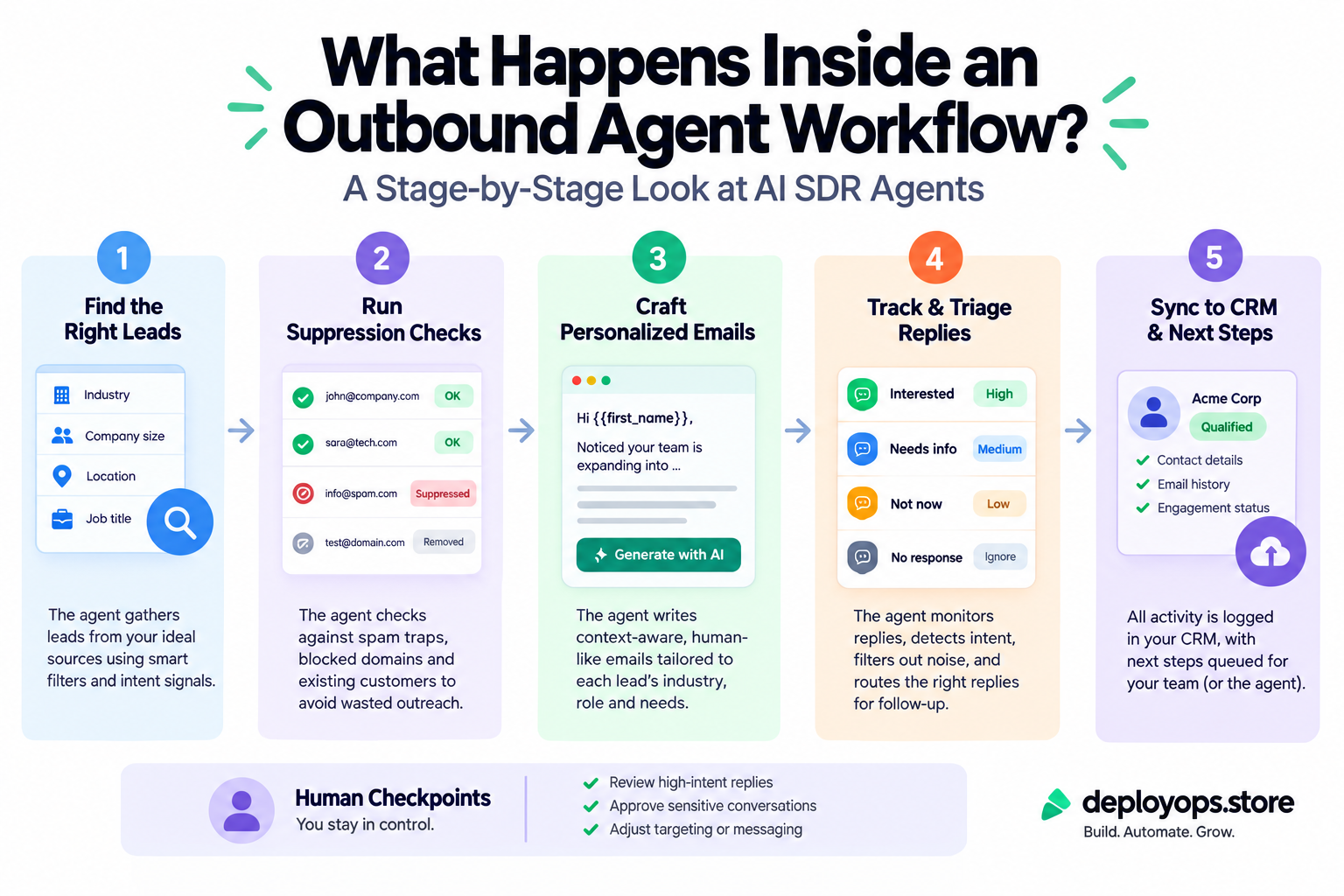
An AI outbound sales agent is not a button that sends thousands of emails. It is a sequence of defined stages, and the good ones keep a person in charge of the two moments that matter most.
Key takeaways
- An AI SDR agent runs five repeatable stages: prospect research, suppression checks, drafting, reply triage and CRM sync.
- Two moments need a person: approving drafts before anything is sent, and answering real replies.
- Google and Yahoo sender rules make review a practical need. Complaints above 0.3% hurt deliverability for every email you send.
- Use the three tools in this article to explore each stage, check your spam rate and test your readiness.
Ask ten sales leaders what “AI outbound” means and you will hear ten different answers. Some picture software that sends thousands of emails overnight. Others picture a smarter mail merge. Very few can say what the software actually does between “here is my target list” and “a meeting is on the calendar.”
That gap matters. An agent with no structure is a liability: it can email the wrong people, say the wrong thing and damage your sending domain in a week. An agent with defined stages, limited permissions and a person at the right checkpoints is a piece of operations you can measure and improve.
This guide walks through what happens inside an outbound agent workflow, stage by stage. It explains what an AI SDR agent is, where a person should stay involved, and how to start without putting your domain at risk. We build and manage these workflows at DeployOps, so it describes how we scope them. Where other teams make different choices, we say so.
What is an AI SDR agent?
An AI SDR agent is software that combines a language model with tools to do the top of funnel work a sales development rep (SDR) would do. That means finding prospects, researching them, writing outreach, sorting replies and updating the CRM.
You will see several names for the same idea: AI SDR, AI sales agent and AI outbound sales agent. Vendors use them loosely. The useful difference is scope. One tool might only draft emails. Another might own the whole loop from lead discovery to calendar booking. The question to ask is how much of the loop the software controls and how much a person controls.
Autonomous agents versus human in the loop AI outreach
There are two broad models. In the autonomous model, the agent owns the sequence and sends with little review. In the human in the loop model, the agent does the preparation and a person approves what goes out.
| Question | Autonomous agent | Human in the loop |
|---|---|---|
| Who sends? | The agent, with little or no review | The agent drafts, a person approves |
| Strength | Coverage and volume | Reply quality, deliverability and brand control |
| Main risk | Errors reach prospects before anyone sees them | Review becomes a bottleneck if nobody owns it |
| Fits best | The long tail of a large market | High-value accounts and new pilots |
Human-in-the-loop sending trades a little coverage for reply quality, deliverability, and brand control.
Our view is simple. Start with a person in the loop. You can loosen review later, once the data shows the agent is reliable for a given segment. You cannot unsend an email.
The five stages of an automated cold email workflow with human review
Every well-built workflow breaks into the same five stages. Use the explorer below to see what the agent does at each one, what a person does, and what to watch.
Interactive
Stage explorer
Select a stage. Amber dots mark where a person takes part.
Human checkpoint
Drafting and approval
The agent
Writes personalized multi-step sequences from the research on each prospect.
The person
Reads every draft before it is sent during the pilot. Approves, edits or rejects.
What to watch
Override rate: how often a person changes or rejects a draft. It should fall over time.
Stage 1: Prospect research
The agent builds the lead list from verified public sources and collects context on each prospect: role, company, recent news and anything relevant to your offer. This is the slow, repetitive work that eats a salesperson’s week.
Quality here decides everything downstream. A thin list produces generic emails, and generic emails produce complaints. The person’s job at this stage is to define the target: the ideal customer profile, the industries to include and the segments to leave alone.
Stage 2: Suppression and verification checks
Before a single word is drafted, the agent checks every lead against suppression lists. Opt-outs, current customers, open deals and do-not-contact records are filtered out first. Addresses are verified so that bounces stay low.
This stage is quiet and unglamorous, and it prevents the most embarrassing failures. Emailing a paying customer with a cold pitch, or a person who already asked to stop, costs trust that no subject line can win back.
Stage 3: Drafting, then human approval
Now the agent writes personalized, multi-step email sequences using the research from stage 1. Each message should reflect something true about the prospect, not a template with a name swapped in.
This is the first human checkpoint. A person reads the drafts before anything is sent. Sending is a consequential action, and our scoping process treats it that way: approval sits between draft and send. During a pilot, we recommend reviewing every message.
Stage 4: Reply triage
Once emails go out, replies arrive. The agent monitors the inbox and sorts them into clear categories such as interested, not now, wrong person and unsubscribe. Nothing sits unread and nothing is filed without a trail.
This is the second human checkpoint. Interested replies go straight to a person, and so do any replies the agent is unsure about. Ambiguous messages are exactly where software is weakest.
Stage 5: CRM sync and handoff
Every outcome is written back to your pipeline, with suppression and opt-out status updated so the same person is not contacted again. Your records stay current without anyone typing them in.
A person spot-checks the sync and owns the relationship from the first real conversation onward. That is where deals are won, and it is not a job for an agent.
Where humans stay involved, and why
People often assume human review exists to slow the agent down. It does the opposite. It is what lets you trust the agent with more work over time.
Most AI SDR deployments fail because the team treats the agent like a fully autonomous rep instead of a constrained workflow engine.
A constrained workflow engine has defined inputs, defined actions and defined handoffs. In practice, a person stays involved at three points.
Before anything is sent
Approval of drafts is the strongest control you have. It catches factual errors, awkward phrasing and mismatched tone. It also teaches you what the agent gets wrong, which feeds back into better prompts and templates.
When a real reply arrives
Software handles clear signals well. It struggles with replies that carry real meaning in few words.
AI handles clear signals well and struggles with ambiguous replies like “check back after our funding round.”
A reply like that is pipeline intelligence. A person reads it, notes the timing and follows up at the right moment.
When something looks wrong
Every workflow needs a stop mechanism and a named owner for exceptions. Our own guidance is that sending messages, changing customer records or handling financial information may need approvals, and that permissions, exception routes and a stop switch should be defined before an agent runs beyond supervised operation.
Why deliverability rules make review a practical need
Human review is good practice, and it is also tied to how inbox providers judge you. Google and Yahoo set requirements for bulk senders. Bulk is defined by Google as more than 5,000 messages a day to Gmail addresses, and Yahoo publishes no fixed number, so the sensible plan is to meet the rules at any volume.
The core requirements are:
- Authenticate your domain with SPF, DKIM and DMARC.
- Offer one-click unsubscribe on promotional mail and honor opt-outs within two days.
- Keep your spam complaint rate below 0.3%, and ideally below 0.1%.
Spam rate is the share of delivered messages that recipients report as spam. One badly aimed batch can push it over the line. That is why drafts get reviewed and why suppression checks run first. Try your own numbers below.
AI SDR agent implementation: a safe rollout
Teams that treat an AI SDR agent implementation as a pilot get better results than teams that treat it as a switch. A pilot has a charter, an owner and a way to say stop.
Write a pilot charter first
Decide one target segment, the segments to exclude, the message variants to test, the approval workflow, the stop conditions and the success metrics. Put it in writing. If you cannot describe a successful run in one sentence, the workflow is not ready to build.
Review everything at the start
Review every message during the pilot. This gives you a quality baseline and shows you the agent’s weak spots. Track your override rate, which is how often a person changes or rejects a draft. When it falls and stays low for a segment, you have evidence to review samples instead of every message.
Widen scope in steps
Add segments one at a time. Keep the stop switch and named owners as you grow. If metrics slip, narrow scope again. Autonomy should follow the data, never the calendar.
Interactive
Pilot readiness check
Tick everything that is already true for your team.
Not yet. Set up the basics below first, because they protect your domain.
- Pick one target segment and list exclusions
- Set up SPF, DKIM and DMARC on the sending domain
- Add one-click unsubscribe and a two day opt-out process
- Build a suppression list
- Name a reviewer for drafts
- Name an owner for interested replies
- Write stop conditions
- Define the pilot success metric
How DeployOps approaches it
Our managed outbound offer, OutboundOS, follows the five stages above. It covers prospect research from verified public sources, personalized multi-step email drafts for review, and reply categorization with CRM pipeline synchronization. The published subscription is $499 a month and includes up to 2,500 researched and verified leads per month, weekly inbox monitoring, suppression checks and ongoing template refinement.
Every project starts with a business task, the systems involved and the decisions that need human review. We define the run criteria and rollback paths before building. Confirm exactly which tools your package includes before you commit, because scope depends on the systems you already use.
Frequently asked questions
What is an AI SDR agent?
An AI SDR agent is software that combines a language model with tools to do top of funnel sales development work: finding and researching prospects, drafting outreach, sorting replies and updating the CRM. A person usually approves messages and handles real conversations.
What are the stages of an outbound agent workflow?
Five stages: prospect research, suppression and verification checks, drafting with human approval, reply triage, and CRM sync with handoff to a person.
Can an AI outbound sales agent run without human review?
Some low-risk steps can run automatically after testing. Sending messages and changing customer records usually need approval. Define permissions, exception routes and a stop mechanism before reducing supervision.
What email rules affect automated cold email workflows?
Google and Yahoo expect SPF, DKIM and DMARC authentication, one-click unsubscribe on promotional mail with opt-outs honored within two days, and a spam complaint rate below 0.3%, ideally below 0.1%.
How should a team start an AI SDR agent implementation?
Start with one target segment, a written pilot charter, review of every message, named owners for approvals and replies, stop conditions and a clear success metric. Widen autonomy only after the review data supports it.