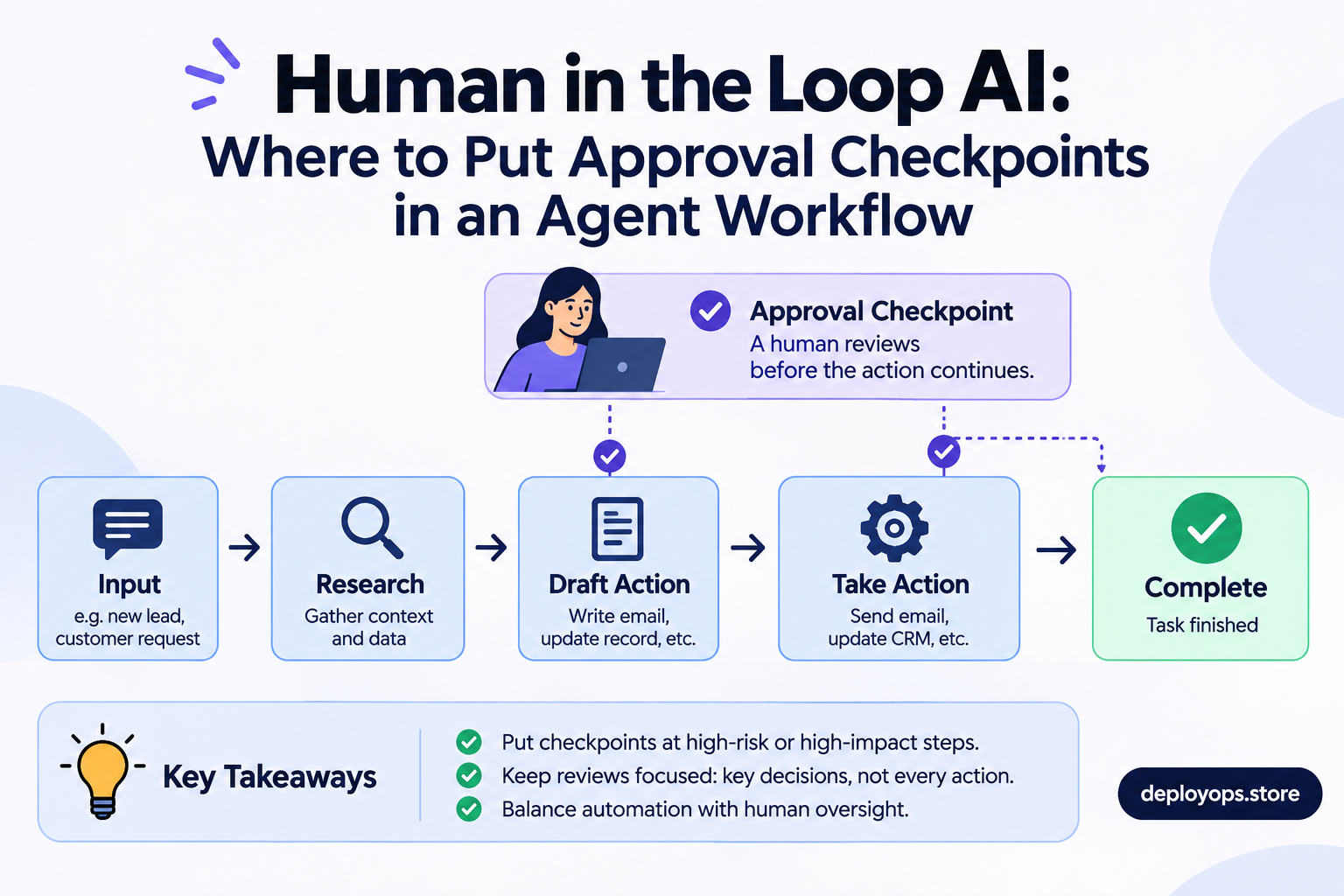
Human in the loop AI is a way of building AI systems so that a person reviews, approves, edits or rejects the agent’s next step before it takes effect. In an agent workflow, that means a deliberate pause at the few moments where a mistake would be costly, public or hard to reverse. Everywhere else, the agent runs on its own.
The hard part is not the pause. It is deciding where to put it. Add too many checkpoints and the people reviewing them stop reading. Add too few and an agent sends the wrong email, refunds the wrong order or deletes the wrong record. This guide gives you four tests for placing checkpoints, a planner you can run on your own human in the loop AI workflow, and design rules that keep approvals meaningful.
What is human in the loop AI?
Human-in-the-loop (HITL) is a design pattern, not a product. The agent does the preparation: it reads the request, gathers data and proposes an action. The workflow then stops at a gate until a person decides. A LangGraph tutorial from Analytics Vidhya describes the split cleanly. The model investigates and recommends, while the application and the human reviewer decide whether that recommendation becomes a real action.
Human in the loop automation is the same idea applied to ordinary business work: a form submission becomes a checked CRM record and a draft reply, and a person approves the reply. MindStudio’s team describes the pattern as:
“a deliberate design choice about where human judgment adds more value than speed”MindStudio, on human-in-the-loop checkpoints
That framing matters because many teams treat a checkpoint as an admission that the model is not good enough. It is closer to a seatbelt than a patch. You fit it because the cost of the rare failure is high, not because failure is common.
Human in the loop vs human on the loop vs out of the loop
People use these three terms loosely, so define them for each step of your workflow. The distinction between human in the loop and human on the loop comes down to timing: before the action, or after it.
| In the loop | On the loop | Out of the loop | |
|---|---|---|---|
| What happens | The agent stops and waits for approval | The agent acts while a person monitors and can roll back | The agent acts and the result is logged |
| Best for | Irreversible, external or regulated actions | High-volume work where a bad outcome is recoverable | Reversible, internal, rule-based steps |
| Main cost | Reviewer time on every action | Monitoring time and a working rollback | Needs strong tests and logs |
| Example | First email to a new prospect | Sampling classified replies each morning | Saving a research note to a CRM field |
Martin Fowler describes three postures for humans working with coding agents: outside the loop, in the loop and on the loop. BrainGrid’s write-up adds a point most explainers skip. You can only supervise a loop if you have written down the standard it is checked against. So define what “done” means before you move any step from in the loop to on the loop.
Customer service shows the trade-off well. Decagon’s glossary points out that an agent waiting for approval on every refund is safe and slow, while one that refunds on its own with a supervisor watching a dashboard is fast and only as safe as that supervision.
Why human in the loop AI agents need checkpoints
Autonomy is arriving faster than governance. Pickaxe cites Deloitte’s 2026 State of AI in the Enterprise report: agentic AI adoption is expected to reach 74% of enterprises within two years, yet only about one in five say they have a mature model for governing autonomous agents. The same post reports a McKinsey finding that only about a third of enterprises meet their own governance bar for autonomous agents. These are secondhand figures, so check the original reports before you quote them in a deck.
Developer behavior points the same way. BrainGrid reports that Anthropic’s 2026 Agentic Coding Trends Report found developers fold AI into about 60% of their work while keeping active oversight on 80 to 100% of what they delegate. Agents do more, and humans do not do less. Summaries of Anthropic’s Building Effective Agents guidance also describe agents that can pause for human feedback at checkpoints or when blocked, and recommend read-only access, limited permissions and approval loops where autonomy is risky.
What the EU AI Act says about human oversight
Article 14 of the EU AI Act requires high-risk AI systems to be designed so they can be
“effectively overseen by natural persons”EU AI Act, Article 14(1)
while they are in use. The article also asks that overseers stay aware of automation bias, the tendency to over-rely on a system’s output, and that they can stop or override the system. Not every agent is high-risk, and a cold email agent is not. The principle still transfers: a person can only oversee what they understand and can interrupt.
Timing is unsettled in the commentary. The AI Act tracker we checked lists 2 December 2027 for standalone high-risk systems, while some advisers still cite 2 August 2026. Confirm current dates with counsel. This is general information, not legal advice.
Four tests for where to put an approval checkpoint
Run each step of your workflow through these four questions. A step that fails none can usually run on its own. A step that fails one deserves monitoring. A step that fails two, or touches money, data or access, deserves a gate. They are four independent tests, not a sequence.
Is it hard to undo?
A sent email cannot be recalled. A drafted email can be deleted. Ask what it costs to reverse the action, including the awkward apology. If the answer is “a lot”, gate it before the action rather than reviewing it after.
Will a customer or partner see it?
MindStudio notes that an error a customer or partner sees costs much more than one that stays internal. An internal CRM stage can be corrected quietly. A wrong figure in a client message cannot.
Is the agent working with thin context?
Agents only know what they are given: the context window, tool outputs and a truncated history. A person often knows the account is mid-renewal or the contact just changed jobs. MindStudio calls this the context gap test. When the gap matters, a human check pays for itself.
Does it touch money, data or access?
Pickaxe lists five actions that should always need approval: deploying to production, sending external messages, moving money, deleting data and changing permissions. We would add one more: changing the agent’s own limits, such as raising a daily sending cap.
Planner: map your own human in the loop AI workflow
Below is an example outbound sales workflow. Toggle the tests that apply to each step and the planner assigns a mode. Add your own steps at the bottom, then compare how many need a gate.
4 of 8 steps (50%) need an approval gate. That is a lot of reviewer time. Check whether some can run on the loop with sampling.
- Research a prospect from public sourcesRuns on its own
- Draft a first emailRuns on its own
- Send the first email to a new prospectGate, in the loop
- Classify an inbound replyMonitor, on the loop
- Update the CRM stageRuns on its own
- Answer a pricing question from a prospectGate, in the loop
- Raise the daily sending limitGate, in the loop
- Delete a lead recordGate, in the loop
Rule used: any step that touches money, data or access gets a gate. Otherwise, zero flags runs on its own, one flag is monitored on the loop, and two or more get a gate. It is a starting point for discussion, not a compliance tool.
A worked example: where checkpoints go in an outbound agent
At DeployOps we scope managed agents around these same questions, including the Cold Mail Agent that handles outbound prospect research and email preparation. Research and drafting run unattended because nothing leaves the building. The first send to a new prospect is the gate, because it is public and permanent. Reply classification runs on the loop: a person samples results instead of approving each one. Changes to sending limits, and deletions of lead records, are gated because they touch access and data.
- Research prospectRuns on its own
- Draft emailRuns on its own
- Approve first sendGate, in the loop
- Classify repliesSampled, on the loop
- Update CRMLogged, out of the loop
The result is a workflow where the human sees a handful of decisions that matter, not a hundred that do not. One agent glossary estimates that well-designed gates cover only the irreversible actions, usually under 5% of total steps. Treat that as a rough guide rather than a rule, and use the planner above to find your own number.
How to design a checkpoint people actually use
Give the reviewer evidence, not a button
FeatBit defines an agent gate as a stateful checkpoint that pauses before a consequential action, gives the reviewer enough context to approve, reject, narrow or roll back, and records the decision for audit. A bare “Approve?” prompt is not a gate. Show what the agent wants to do, why, which sources it used, what will change and whether it can be undone. Offer more than two answers: approve, edit, reject or narrow.
Treat a pending approval as work, not a popup
An agent may wait hours for an answer, so its state has to be saved. FeatBit calls pending approval durable work, and the OpenAI Agents SDK documentation describes serializing and resuming run state for long approvals. Decide in advance what happens on a timeout. Fast.io suggests choosing between a reminder, a safe failure or a default action. For anything external, we lean toward failing safe.
Fight review fatigue
The most common failure is not a missing checkpoint. It is a checkpoint nobody reads. A builder writing on Pickaxe’s blog put it plainly:
“By the fiftieth approval, I wasn’t reading them anymore. I was just clicking.”Pickaxe, on human-in-the-loop AI agents
Waxell points to an April 2026 MIT Technology Review piece arguing that “human in the loop” oversight can become an illusion. A person can be technically in the loop while reviewing with incomplete context, under time pressure. Use the calculator to see what your approval volume costs in reviewer time.
The arithmetic is exact. The labels (manageable, heavy, rubber stamp) are our rule of thumb, not a published standard.
Loosen checkpoints from evidence
MindStudio observes that a clean track record makes it easier to reduce checkpoints later, from a position of trust rather than anxiety. Track approvals, edits and rejections for each gate. If a gate approves nearly everything untouched for weeks, test moving it on the loop with sampling and a rollback path. If reviewers keep editing, fix the prompt or the data first. Never loosen a gate that sits on money, data or access.
Tools for human in the loop automation
You do not need to build the pause from scratch. Permit.io’s guide points to LangGraph’s interrupt() call for stopping a run until a person responds, and to the HumanLayer SDK for routing approval requests to Slack, email or Discord. The OpenAI Agents SDK documents pausing sensitive tool calls until a person approves or rejects them. In low-code tools, n8n human in the loop steps let a workflow wait for a reply before continuing, so check the current n8n docs for the nodes your version supports.
Whatever you choose, keep the policy for which actions need a gate in your application and permissions rather than only in a prompt. FeatBit makes the same point: the application-owned boundary is where approval policy belongs, because a prompt can be talked around.
Frequently asked questions
What is human in the loop AI?
Human in the loop AI is a design pattern where an AI system pauses at defined checkpoints so a person can review, approve, edit or reject its next action before it takes effect. In AI agents, it is used for consequential steps such as sending messages, moving money or deleting data.
What is the difference between human in the loop and human on the loop?
In the loop means the agent stops and waits for a person before acting. On the loop means the agent acts on its own while a person monitors the results and can intervene or roll back. Choose per step: in the loop for irreversible or external actions, on the loop for high-volume, recoverable work.
Does human in the loop slow AI agents down?
It adds latency equal to the time a person takes to review, so it slows an agent if you gate every step. Gate only the few consequential actions and let the rest run, and the cost stays small. The planner above shows what share of your own steps need a gate.
Which AI agent actions should always require approval?
Pickaxe’s list is a good baseline: deploying to production, sending external messages, moving money, deleting data and changing permissions. Add any action that changes the agent’s own limits.
Is human in the loop required by law?
For high-risk AI systems in the EU, Article 14 of the AI Act requires human oversight by design. Most business agents, such as outbound email or internal triage, are not high-risk, but the same practice is sound engineering. Confirm your own obligations with a lawyer.